Choose the workflow you need to prove
Choose tour operator software by testing your must-have workflow with the same enquiry in each shortlisted system. Compare Tripshaped, Ezus, Tourplan and Bókun using documented answers, a representative demo and an evidence sheet. Select the option that meets your requirements; leave unresolved questions open until someone can demonstrate the answer.
Tripshaped publishes this guide and is one of the options below. This is a review of public product information checked on 30 October 2026, not hands-on testing of all four systems. The shortlist is representative, and there is no overall winner.
For a tailor-made operator or destination management company (DMC), the core job may be carrying one enquiry through itinerary design, supplier costing, a proposal and booking operations. A scheduled departure adds questions about dates, capacity and resources. A ticketed activity may put online checkout and channel availability first. Your business may need more than one of these workflows.
Write down which steps must happen in one system and which can stay in an existing tool. If your spreadsheet and itinerary tool already support a controlled process, keeping them is a valid alternative. Record the handoffs and gaps before deciding that migration is justified.
What do Tripshaped, Ezus, Tourplan and Bókun describe?
The table separates published product scope from questions to demonstrate. A question in the last column does not mean a capability is absent. Competitor descriptions are vendor statements, not independently verified outcomes.
| Option | Published scope | What to prove for your business |
|---|---|---|
| Tripshaped | An enquiry becomes one Trip with its itinerary, Proposal and Booking. Contacts and Inventory are reusable. | Show your enquiry-to-booking workflow. Tripshaped does not process customer-agency payments or convert currencies; check how required payment and currency work will be handled. |
| Ezus | Its website describes FIT, groups and MICE, with itinerary building, integrated CRM, supplier management and online payment through Ezus Pay. | Demonstrate the same trip, rate gap and approval steps. Confirm the commercial terms and payment arrangements applicable to your business. |
| Tourplan | Its website presents inbound, outbound and DMC solutions, listing FIT, groups, MICE, tailor-made itineraries and scheduled tours. | Demonstrate your sales, operational and finance requirements together, including the departure or group controls you need. |
| Bókun | Its website describes booking widgets, channel management, availability synchronization and connections to payment providers. | Demonstrate the direct-booking and distribution channels you actually use, plus any multi-day planning and costing requirements. |
Read the current product descriptions on Tripshaped Agency OS, Ezus, Tourplan and Bókun before arranging demonstrations. These sources describe scope; they do not establish that every workflow fits your operation.
If online payment collection or live distribution is mandatory, require a demonstration and written terms for that requirement before committing. Do not infer suitability from an itinerary screenshot, or rule out multi-day use from a product category alone.
Run the same fictional enquiry through each demo
Use a fictional six-person, multi-day enquiry with accommodation, one transfer and one activity. Give every vendor the same dates, party details and requirements. Do not use real customer records. Leave one supplier rate unresolved and include a supplier item whose currency differs from the trip’s selling currency.
Ask the demonstrator to start with the enquiry, rather than a finished proposal. Record who owns the next action, where reusable supply comes from, how missing rates appear and which information the customer will see. Then follow the work through commercial review, sharing and the booking decision.
- Enquiry: identify the responsible person, next follow-up and the record that carries the working brief.
- Supply: add the stay, transfer and activity. Identify each rate’s supplier, applicable dates and relevant occupancy or quantity.
- Costing: inspect the unresolved rate and currency mismatch. Ask what remains incomplete and what a person must resolve before issuing a price.
- Sharing: compare the internal view with the customer view. Identify internal costs and notes, and ask what happens to a previously shared version after an edit.
- Booking: show what records customer confirmation, who can commit the booking and whether payment collection is a separate step.
Copy this buyer evidence worksheet
Create one copy for each shortlisted option. Mark each requirement must-have or optional before the demo. In the documented-answer column, save the exact vendor answer, source URL and date. In the observed-result column, record what happened during your demo and label it demonstrated, vendor-stated, not verified or does not meet this requirement.
Use demonstrated only for a step you actually observed. Vendor-stated means the claim has a source but has not been tested in your scenario. Not verified means the answer is still open. Use does not meet this requirement when the evidence establishes a mismatch. An empty cell is not a failure score.
| Requirement | Importance | Same demo step | Documented answer, URL and date | Observed result and evidence status | Open question and owner |
|---|---|---|---|---|---|
| Enquiry ownership | Set must/optional | Assign the enquiry and next action | To record | Not verified | Who follows up? |
| Reusable supply | Set must/optional | Add the same stay, transfer and activity | To record | Not verified | Where do rates come from? |
| Costing gaps | Set must/optional | Leave one rate unresolved | To record | Not verified | What blocks a complete price? |
| Currency handling | Set must/optional | Use one mismatched-currency item | To record | Not verified | Who resolves the mismatch? |
| Customer sharing | Set must/optional | Compare internal and shared views | To record | Not verified | What information is excluded? |
| Booking boundary | Set must/optional | Record customer confirmation | To record | Not verified | Who can create the booking? |
| Payment needs | Set must/optional | Trace required collection and records | To record | Not verified | Which provider and terms apply? |
| Distribution needs | Set must/optional | Check a required channel and availability | To record | Not verified | Which connections are included? |
| Migration and export | Set must/optional | Review fictional sample input and output | To record | Not verified | What needs manual preparation? |
| Team permissions | Set must/optional | Try the workflow with relevant roles | To record | Not verified | Who can view, edit and commit? |
Do not total the statuses into a feature score. One unmet must-have can matter more than several optional features. Keep the unresolved question, responsible person and next check beside the evidence.
What Tripshaped’s workflow means for this comparison
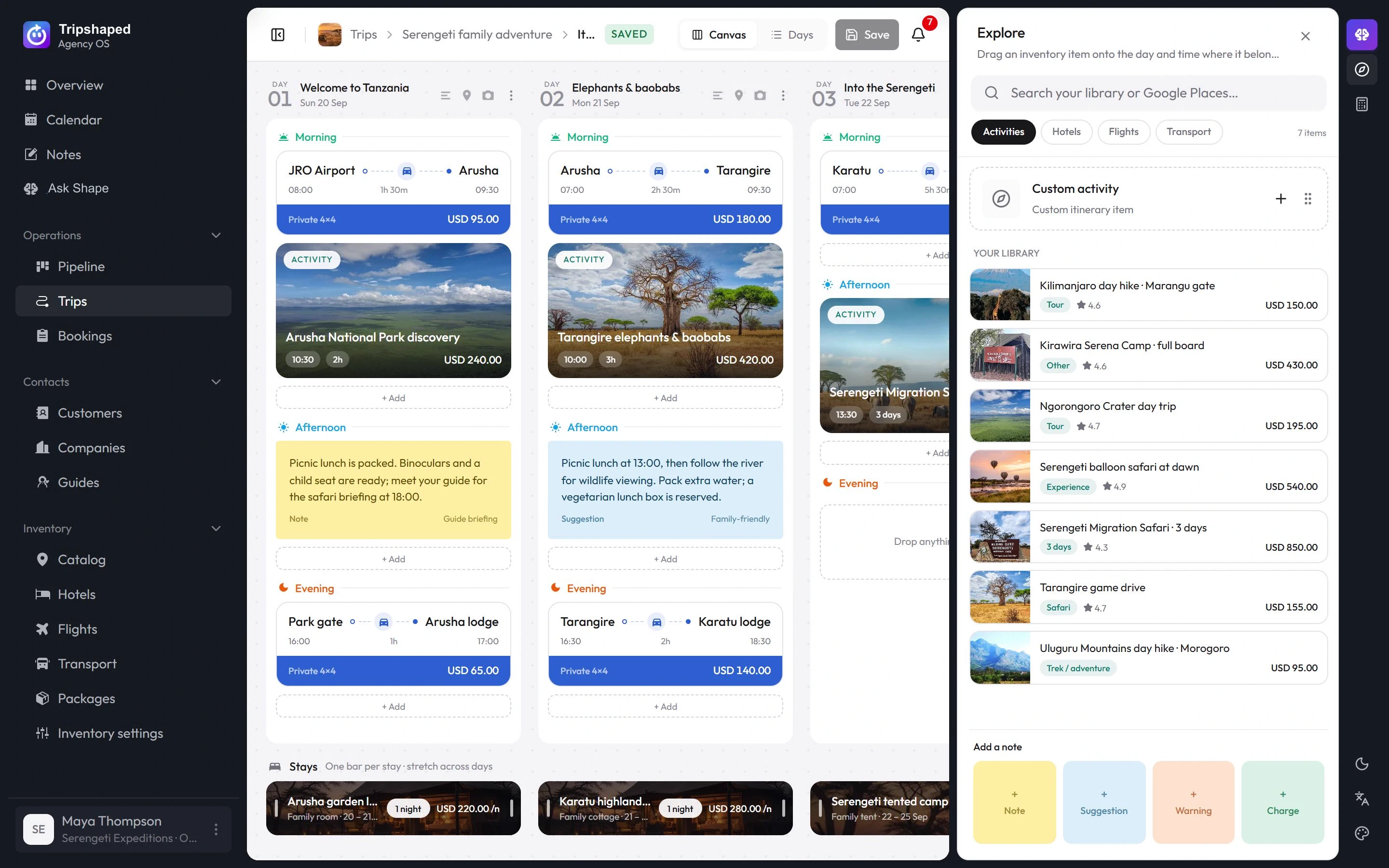
Tripshaped organizes an enquiry as one Trip. The itinerary, Proposal and Booking belong to that workflow, while Contacts and Inventory remain reusable. Its public workflow includes day-by-day activities, stays and transfers. See Tripshaped Agency OS for the product overview.
Missing or mismatched supply is reported as a pricing gap rather than a zero price. Tripshaped does not convert currencies. In your demo, ask to see the incomplete item and the action needed to resolve it. The itinerary pricing guide gives a separate worked explanation of rate and currency questions.
Shared Tripshaped links are read-only. The customer confirms directly with the agency, and an authorized agency member creates the Booking. Tripshaped does not process the payment between the customer and agency. Decide whether that boundary matches your collection and confirmation process.
Ask Shape can read relevant business context and propose a limited set of actions; a signed-in person confirms every write. It does not make customer, money or commitment decisions by itself. Human confirmation is not unique to Tripshaped: Ezus also describes its AI connector as read-only by default, with a preview and confirmation before changes. Demonstrate the permissions and confirmation steps you require in each product.
Check the work of switching before signing
Ask each vendor to review a small fictional sample of your intended input formats. Confirm which contacts, supplier rates and itinerary content can transfer, what needs cleanup or manual preparation, and who owns that preparation. Do not assume automatic import into Tripshaped.
Ask for a sample export as well. Check what your team can retrieve, in which format and under which terms. Establish the access roles, training, support and responsibilities required for your first representative trip.
Compare current written commercial terms for your team, required connections and payment arrangements. This guide omits subscription prices and migration timelines because a buyer needs terms that apply to their own scope. Record the quote date and any unresolved costs rather than estimating savings.
Do I need a booking engine or an operations workspace?
Start with the transaction you need to support. If customers must select availability and pay online, demonstrate that booking and payment path. If staff must assemble and price a tailor-made trip before presenting it, demonstrate that enquiry-to-proposal path. If both are essential, test how the two paths connect and who owns each handoff.
Which software is best for a small tailor-made operator?
The best fit is the option whose demonstrated workflow meets your must-haves within terms your team accepts. Team size alone does not resolve payment, distribution, costing or permission requirements. Use the same evidence sheet for your existing tools as well as new systems.
Choose the next demonstration
Shortlist the options whose documented scope matches your required workflow. Send the same fictional enquiry and worksheet to each vendor, then resolve open must-haves before committing.
For detailed itinerary-design questions, use the trip-builder buying guide. For responsibility between sales and operations, use the lead-to-booking handoff guide. Keep this comparison focused on the whole software decision.
To evaluate Tripshaped specifically, review the Agency OS workflow and book a demo. Ask the demonstrator to work through your must-haves, unresolved rates and booking boundary.